
PaperCut 16.0
PaperCut 16.0 has rolled out the door (and a quick bug fix to keep us on our toes).
PaperCut 16.0 comes with a fantastic new feature called Direct Printing. Direct Printing is going to let you print from a computer to a printer without the need for a print server. So now organisations of any size can track and report on printing while keeping configuration, administration and reporting simple. This adheres to PaperCut’s philosophy of supporting any platform and letting PaperCut work for your customer by not forcing the customer to change their infrastructure.
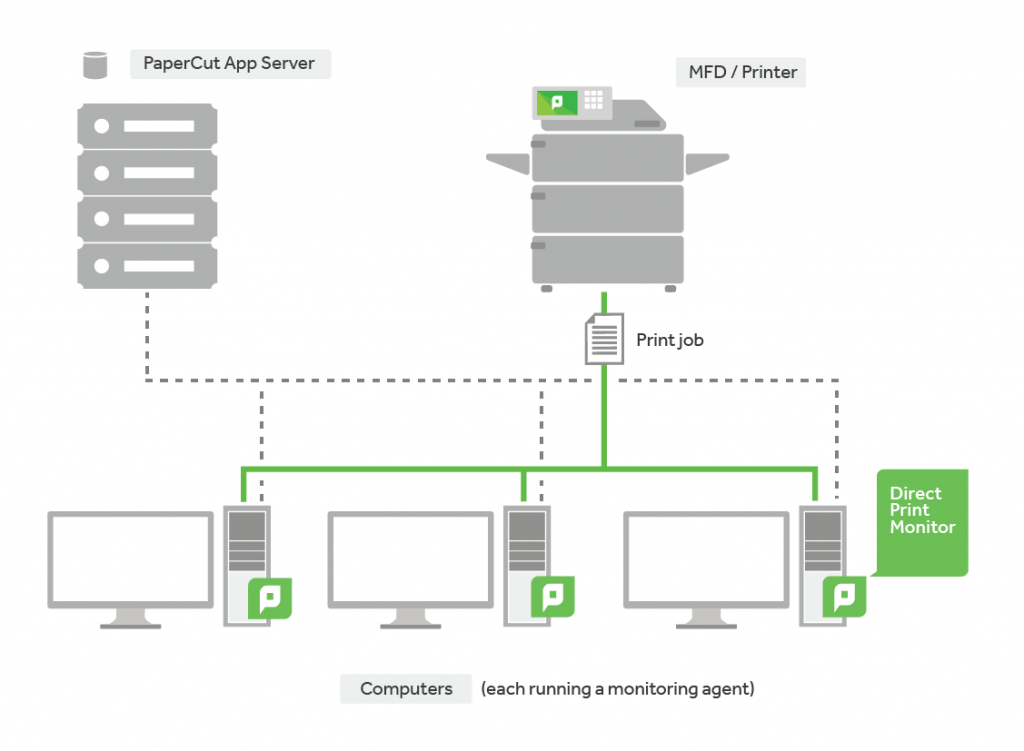
Direct Printing will allow the print job to be processed on the user’s computer. While running a small PaperCut agent, the print job information (not the file) will be sent to the PaperCut Application server for reporting purposes. Direct Printing is ideal for organisations with distributed branches such as post offices, bank branches, petrol stations and retail outlets. The company’s headquarters can track and report on printing using a print server but avoid the cost and maintenance of having one in each branch.
What this will also let you do is combine the “Direct Printing” feature with a “Private Cloud” implementation of PaperCut, thus eliminating the need for any locally based servers. You can easily host PaperCut off-site and the local PCs will process the jobs. No more sending huge data files across the network WAN to be processed on a central server.
If you need any further information on any details of PaperCut 16.0 ‘s fantastic new feature-rich release then please get in touch with your channel manager.
Is that all?
Not by a long shot…please see below for a full list of new features:
- Notifications for Printer Groups – By popular demand
- Easier Mail Server setup – Drop down auto-complete for popular email services to save on administration, no more messy config keys
- A new look manual – The support site has been given a touch of paint and a flash new theme to keep up with the new PaperCut branding
- PaperCut MF on Epson, Muratec, OKI and Sindoh platforms – 24 supported embedded platforms and counting
- Canon accessibility improvements for PaperCut MF – improving current generation embedded applications for ease of use
Updated training courses are also available, contact us for details. As always full release notes below.
-
New Features:
- Direct Printing:
- Customers no longer have to run a print server to be able to take advantage of PaperCut's feature set. PaperCut's Direct Print Monitor tracks jobs between desktops and an MFD. Significant UI improvements around queue management ensure no additional administrative overhead.
- New look PaperCut MF manual:
- We are revamping the PaperCut MF manual. This first phase includes a refresh to the User Interface and easier navigation and search functionality.
- PaperCut MF on Epson, Muratec, and OKI:
- We have extended the range of devices supported by PaperCut MF. In partnership with PaperCut, Epson, OKI, and Muratec have developed device integration for secure tracking and print control on Epson inkjets, Muratec MFDs and additional OKI MFDs.
- Mail server configuration:
- Configuring PaperCut to SMTP servers is now even easier with drop-down selections for popular mail servers (Gmail, Outlook.com, Yahoo), as well as bringing encryption and optional login settings into the UI.
- Printer group notifications:
- Administrators are now able to use Printer Groups to deliver low toner and error notifications to specific recipients. This allows the most appropriate person to receive the alert per device.
- Direct Printing:
-
Enhancements:
- Improved the Printer Notification messages (Low Toner and Printer Error) by optionally including additional information such as serial number, IP address and model of a device.
- You now have the option to receive low toner notifications when they occur, or alternatively in hourly or daily batches.
- System Notifications: Increased the maximum send frequency for "Error level events " and "Printers in error" to 1440 minutes (1 day) on the Notifications page.
- Mobile Release: Users can now log in to Mobile Release using their email address as an alternative to their username.
- Customers using applications like SCCM to manage their software updates can now take advantage of PaperCut reporting version numbers to the Operating System.
- You can now disable a shared account for an exact period of time via server commands.
- Added the ability to specify a custom Windows Active Directory attribute a user's primary email address.
- The customer reference number is now available on the About page.
-
Fixes:
- Unused printer groups are no longer deleted during scheduled maintenance tasks.
- Improved notifications for customers attempting to upgrade without a valid license.
- Fixed an incorrect confirmation message displayed when disabling GCP options.
- The PaperCut icon is now shown in the Windows Add or Remove Programs list for the Client, Client MSI (installer), Payment Gateway Module, and Card Creation Wizard.
- Fixed an issue on the Devices page causing the page title and the title of the unselected tab to be hidden.
- Prevent Chrome browsers from auto-populating unwanted data in the User Details and Create Device pages.
- Email to Print and Google Cloud Print: Fixed an occasional issue causing part of a page to not print.
- Fixed a rare issue that prevented Site Servers from synchronizing with the Application Server.
- Fixed a minor issue in some Hardware Page Count Validation dialogs where code was being displayed in place of text.
- Fixed a rare Site Server issue where changes made to groups of users weren't being updated to the site.
- Fixed a rare issue in version 15.3 (Build 34230) and 15.3 (Build 34420) causing inaccurate colour/grayscale reporting when PaperCut cannot detect page-level colour and page-level colour detection is enabled.
-
Copier / Device Integration:
- Canon (MEAP)*:
- Support for both a USB card reader and USB keyboard on the same MFD.
- Easier SSL certificate management.
- Resolved an issue where enabling scan tracking incorrectly started counting faxes as scans.
- Added support for iRADV 85xx and 65xx series devices.
- Updated PaperCut branding.
- Fixed an issue preventing restricted users from logging in after a fax job has been cancelled due to insufficient funds.
- Fuji Xerox (AIP) / Dell (AIP)*:
- Now formally out of the Early Access Program.
- Embedded card-reader plugin version 1.0.8: Fixed an issue causing an MFD that is in power save mode, with an attached card reader, to be unresponsive.
- Fixed an issue with Chinese characters displaying incorrectly on Fuji Xerox DMP 9 devices.
- HP (Chai)*:
- Fixed an issue where the custom currency sign 'Display after number' option was not reflected in the balances displayed on devices.
- Kyocera (HyPAS) v34034*:
- Added a Settings button to Command Center RX allowing access to the remote Device Setup page.
- Improved responsiveness when unlocking the device.
- Corrected the layout of the Print Release Printer Busy screen.
- Fixed an occasional issue on older devices causing the installation to fail.
- Fixed an occasional "Invalid server session" error that occurred when logging in after a period of inactivity.
- Fixed an intermittent issue that caused an error message to be displayed on the 'Devices' page after the Application Server was restarted.
- Lexmark (LeSF)*:
- Easier SSL certificate management.
- Improved the readability of document names on the device Release screen by allowing administrators to specify the number of characters in the document name to display.
- Fixed a rare issue in Lexmark 2.1 embedded causing it to fail when the last page of a copy job caused the user to run out of credit.
- Fixed an issue on the Lexmark LeSF 2.1 causing copy, scan, and fax settings to revert to the system defaults after each copy job.
- Ricoh (ESA)*:
- Easier SSL certificate management.
- Improved detection of copy/scan jobs in progress when there is no fax.
- Samsung (XOA)*:
- Easier SSL certificate management.
- Sharp (OSA):
- A numerical keypad is now provided for ID entry on the device.
- A numerical keypad is now provided for PIN entry on the device.
- Fixed an issue on devices with a physical keyboard requiring the user to press input fields twice.
- Sindoh (Open API):
- Added support for Sindoh devices.
- Canon (MEAP)*:
-
The Rest:
For Integrators:
- The getAllGlobalConfig method in the ExtDeviceIntegrationXMLRPCAPI API has a new key/value pair (currency-symbol-position-start) that is used to specify the position where the currency symbol should be displayed in the currency format.
Other Notes:
- This release contains a database upgrade.
- As per the End of Life announcement, this release discontinues support for new installs or upgrades of the PaperCut server software on Mac OS X 10.8.
- As per the End of Life announcement, this release discontinues support for Internet Explorer 7, 8, and 9. Administrators will receive a warning message when they log in to the administration console, and they can still choose to continue.
- Devices marked with * require installing an updated version of the embedded software to access new features and fixes.
If you would like to know more about PaperCut 16.0 get in touch with the team sales@selectec.com